
Last updated on
Oct 31, 2026
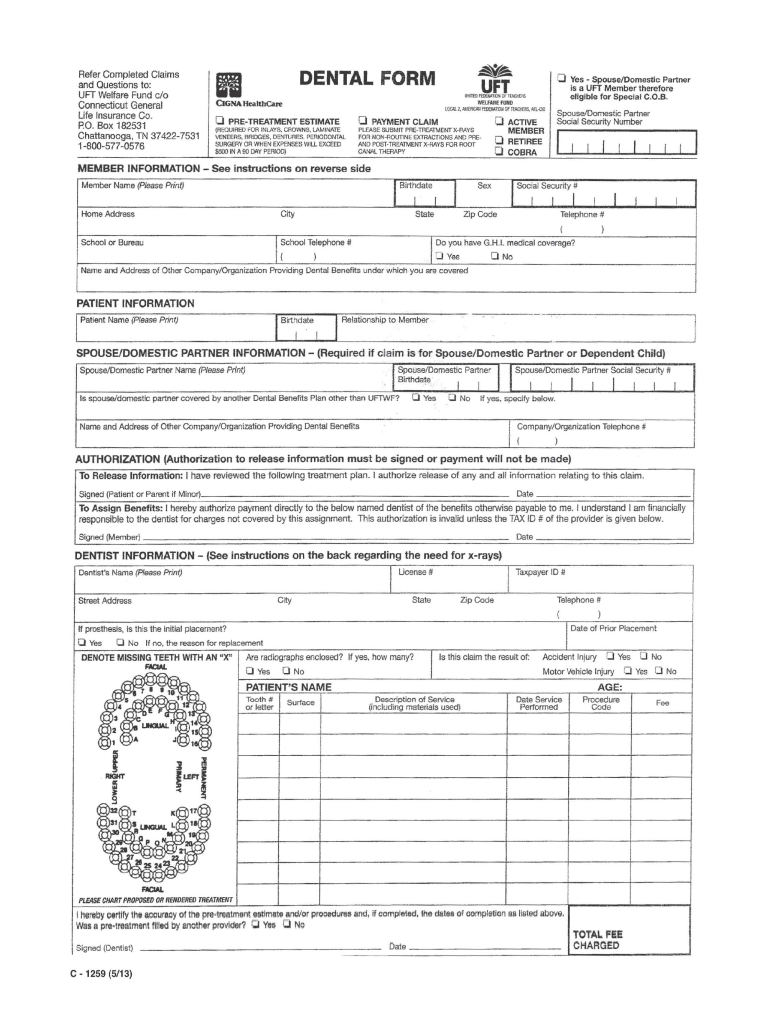
UFT C-1259 2013-2026 free printable template
pdfFiller is not affiliated with any government organization

Fill out
Complete the form online in a simple drag-and-drop editor.

eSign
Add your legally binding signature or send the form for signing.

Share
Share the form via a link, letting anyone fill it out from any device.

Export
Download, print, email, or move the form to your cloud storage.
Why pdfFiller is the best tool for your documents and forms


End-to-end document management
From editing and signing to collaboration and tracking, pdfFiller has everything you need to get your documents done quickly and efficiently.
Accessible from anywhere
pdfFiller is fully cloud-based. This means you can edit, sign, and share documents from anywhere using your computer, smartphone, or tablet.
Secure and compliant
pdfFiller lets you securely manage documents following global laws like ESIGN, CCPA, and GDPR. It's also HIPAA and SOC 2 compliant.
What is UFT C-1259
The UFT Dental Claim Form is a healthcare document used by members of the United Federation of Teachers Welfare Fund to submit dental treatment claims for reimbursement.
pdfFiller scores top ratings on review platforms




Easy to use with very good features of how text can be manipulated on form. I'm completely impressed of how great the resulted form looked. Glad I decided to become a member.
PDFfiller is allowing me to save time and paper filling in documents that are received in PDF form to be completed and resent in a timely manner. This make for better office management and efficiency.
Who needs UFT C-1259?
Explore how professionals across industries use pdfFiller.

UFT C-1259 is needed by:
-
Patients seeking reimbursement for dental treatments
-
UFT members enrolled in dental benefits
-
Dentists providing services to UFT members
-
Healthcare administrators managing claims
-
Insurance coordinators processing dental reimbursements
Comprehensive Guide to UFT C-1259
What is the UFT Dental Claim Form?
The UFT Dental Claim Form is a vital document for members of the United Federation of Teachers Welfare Fund to request reimbursement for dental treatments. This form facilitates the efficient processing of claims, ensuring members receive proper compensation for services rendered. Patients, members, and dentists all play critical roles in utilizing this form effectively.
By completing the UFT dental claim form, individuals can expedite their dental treatment reimbursement process. Understanding the significance of this form helps in navigating the complex landscape of dental expenses for UFT members.
Purpose and Benefits of the UFT Dental Claim Form
Using the UFT Dental Claim Form offers several key advantages for members filing dental expense claims. Firstly, it simplifies the reimbursement procedure, making it easier to track submissions and claims status. Secondly, the form provides a structured method for documenting dental treatments, ensuring that all necessary information is included.
Members benefit financially by using this form to secure reimbursements, which helps alleviate unexpected dental costs. The clarity and organization of the UFT Dental Claim Form enhance its usability, making it a vital resource for accessing UFT dental benefits.
Who Needs the UFT Dental Claim Form?
The UFT Dental Claim Form is essential for three main roles: the patient, member, and dentist. Each participant must provide their specific information to validate the claim and ensure its success. Eligibility to utilize this form typically includes anyone covered under the UFT Welfare Fund.
It's crucial that signatures from all parties involved are obtained, as this adds another layer of authenticity and confirms the details of the dental treatment claim.
How to Fill Out the UFT Dental Claim Form Online
Filling out the UFT Dental Claim Form online can be effortlessly managed by following these steps:
-
Access the form through pdfFiller.
-
Enter essential details such as Member Name and Social Security Number.
-
Provide the dentist's information and service details.
-
Review all entries for accuracy, ensuring that each section is completed.
-
Sign the form where indicated.
Common mistakes to avoid include omitting necessary fields and providing incorrect information. A careful review can prevent submission delays and enhance the claim processing experience.
Review and Submission of the UFT Dental Claim Form
Before submitting the UFT Dental Claim Form, reviewing it is paramount to ensure that all information is accurate and complete. This step reduces the chance of rejections and expedites the processing time.
Submissions can be completed via various methods: online through pdfFiller, by mail, or via fax. Each submission method has its specifics, so following the guidelines meticulously can facilitate a smoother reimbursement experience. Furthermore, being aware of submission deadlines helps in managing expectations for reimbursements.
What to Do After Submitting the UFT Dental Claim Form
Once the UFT Dental Claim Form has been submitted, it's beneficial to understand the next steps involved in the process. Typically, claims are processed within a specific timeline, and members should be prepared to wait for updates on their submissions.
Members can check the status of their claims through the UFT Welfare Fund’s customer service or online portal. It’s essential to know what to expect regarding reimbursements, as well as potential issues such as claim rejections and how they can be addressed.
Security and Compliance for the UFT Dental Claim Form
Data security is a top priority when dealing with sensitive healthcare documents like the UFT Dental Claim Form. pdfFiller utilizes advanced security measures, including 256-bit encryption, to protect personal information during the submission process.
Additionally, compliance with HIPAA and GDPR standards ensures that user privacy is maintained. Using a secure platform like pdfFiller is vital for anyone handling healthcare forms, providing peace of mind when sharing sensitive information.
Utilizing pdfFiller to Complete the UFT Dental Claim Form
pdfFiller offers a range of engaging features that make completing the UFT Dental Claim Form efficient and effective. Users can edit text, annotate, and even eSign documents, all within a secure online environment.
The platform also allows for easy conversion between PDF and other formats, significantly enhancing the usability of the UFT healthcare form. With pdfFiller's user-friendly interface, members enjoy a seamless form-filling experience that saves time and reduces frustration.
Sample or Example of a Completed UFT Dental Claim Form
Having a completed example of the UFT Dental Claim Form can serve as an essential reference for users. A visual guide helps illustrate how each section of the form should be filled out correctly, ensuring accuracy and completeness.
This annotated sample can assist members in recognizing the critical fields and signatures required, making the form-filling process more straightforward and efficient.
Start Your UFT Dental Claim with Confidence Today!
Ready to begin? Using pdfFiller, you can take the first step in completing the UFT Dental Claim Form with confidence. By following the outlined steps and leveraging the benefits of pdfFiller, you'll streamline your dental reimbursement process.
Embrace the ease of use and security offered by pdfFiller to manage your dental claims effectively!
How to fill out the UFT C-1259
-
1.To access the UFT Dental Claim Form on pdfFiller, visit the website and log in to your account, or create a new account if you don’t have one.
-
2.Once logged in, navigate to the form by searching for 'UFT Dental Claim Form' in the search bar. Select the form from the results to open it.
-
3.Before starting, gather all necessary information, such as your social security number, details of the dental treatment, and information about your dentist.
-
4.Begin filling out the form by clicking on the first field, which is usually 'Member Name.' Type in your name using the keyboard.
-
5.Next, move to the 'Social Security Number' field and enter your number. Ensure accuracy to avoid delays in processing.
-
6.Continue filling each section, including information about the dentist, treatment provided, and any other required details, using the fillable fields in the document.
-
7.Follow the explicit instructions provided in the form, such as signing in the designated areas. You may need to click on the 'Signature' field to apply your signature electronically.
-
8.Once all fields are filled, review your responses for accuracy. Pay special attention to spelling and numerical entries.
-
9.If needed, use pdfFiller’s tools to edit or add additional information before finalizing the document.
-
10.After completing the review, save the form to your pdfFiller account by clicking 'Save', or directly download it to your device by selecting 'Download'.
-
11.Finally, you can submit the form electronically if the option is available, or print it out for manual submission according to the submission guidelines provided.

Who is eligible to use the UFT Dental Claim Form?
The UFT Dental Claim Form is intended for members of the United Federation of Teachers Welfare Fund who are seeking reimbursement for dental treatments received.
What information do I need to complete the form?
You will need your social security number, details about the dental treatment provided, and information regarding your dentist to accurately complete the UFT Dental Claim Form.
What are the submission methods for the UFT Dental Claim Form?
You can submit the UFT Dental Claim Form electronically through pdfFiller or print and mail it to the address specified by the UFT for processing claims.
Are there any common mistakes to avoid when filling out the form?
Common mistakes include missing signatures, incorrect social security numbers, and failing to provide complete treatment details, all of which can delay reimbursement processing.
How long does it take for claims to be processed?
Processing times can vary, but it typically takes several weeks for dental claims submitted using the UFT Dental Claim Form to be reviewed and reimbursed.
Do I need to include supporting documents with my claim?
Yes, it is often necessary to include supporting documents such as receipts and treatment records along with the UFT Dental Claim Form to substantiate your claim.
Is notarization required for the UFT Dental Claim Form?
No, notarization is not required when submitting the UFT Dental Claim Form, which simplifies the process for members.
Related Forms





Related Catalogs
Get the latest insights from our blog


If you believe that this page should be taken down, please follow our DMCA take down process
here
.
This form may include fields for payment information. Data entered in these fields is not covered by PCI DSS compliance.